Tampilkan postingan dengan label Info. Tampilkan semua postingan

Senin, 01 Juli 2013

Windows 8.1 Preview ISO Direct Download Link

As we all know Microsoft have launched its updated version of  Windows 8 i.e. Windows 8.1 Preview. Windows 8 has not been so successful as compare to Windows 7 and other previous versions, so lets see how users will rate to Windows 8.1 Preview. If you are interested in trying windows 8.1 preview then you can download and try it. Users who have installed windows 8 can directly download update from windows store. But user who prefers direct download of ISO file can download it from link mentioned in the post.

Windows 8.1 Preview ISO Direct Download Link

Note: Windows 8.1 Preview isn't currently supported on some tablets and PCs with newer 32-bit Atom processors. Get the details

Windows 8.1 Preview ISO File Download Link

English 64-bit (x64)  Download (3.49 GB)

English 32-bit (x86) Download (2.59 GB)

Product Key: NTTX3-RV7VB-T7X7F-WQYYY-9Y92F

How to install Windows 8.1 Preview from an ISO file

This procedure is for Windows 8 users.
  1. Download the ISO (.iso) file from above given links.
  2. After downloading double-click the ISO file.
  3. Double-click setup.exe and follow the steps.
Important: If you don't have recovery media, we recommend that you create a USB recovery drive before you install Windows 8.1 Preview so that you can go back to Windows 8 if you need to.

Be Social! Take a second share this post with your friends if it helped you also like us on facebook and stay updated with latest posts.

Rabu, 15 Mei 2013

Get Free Recharge of RS 100 - Daily

Do you want free RS 100 recharge? If yes than you can get is easily by just answering a question daily. This amazing offer is from Quikr. They have launched a treasure hunt contest in which they daily ask a very simple question and first 1000 users who answer the question correctly will get RS 100 recharge.

Get Free Recharge of RS 100 daily!

Actually this contest has started from 27 April. I was not sure that it is genuine or not so I didn't posted it earlier but today I got a RS 100 recharge. Hence it is genuine so everyone must go for it. Just visit below link and answer the question asked by Quikr.

Free RS 100 Recharge: Quikr Treasure Hunt

Be Social! take a second to share this post with your friends, also like us on facebook and stay updated.

Sabtu, 11 Mei 2013

Unlimited Free Airtel 3G for One Month

Unlimited 3G for one month! Yes, It is 100% true that you will get free unlimited 3G data usage for one month. Airtel has launched a new promotional offer in which you can get free Unlimited 3G data usage. Airtel has launched this offer for its new postpaid customers, under which new Airtel postpaid customers including those are ported in via MNP ( and opted postpaid) will get true unlimited 3G data usage for full 1 month. So just go for Airtel postpaid and enjoy 30 days free Unlimited 3G data usage.

Unlimited Free Airtel 3G for One Month

This offer is valid in all 13 circles expect Tamil Nadu and Kerala. This scheme will automatically deactivated after one month so you will not be charged even a single penny.

Be social! Share this post with your friends so they can also enjoy Unlimited 3G also Like us on facebook and stay updated

Senin, 29 April 2013

List of Torrent Leeching Sites - 2013

We all know that zbigz is the best torrent caching client. But on the free version you get  very slow Speed and there are many limits and for getting full advantages of it user’s Need to buy premium Account. Earlier we used premium cookies to hack zbigz but it is now blocked by zbigz. So we are sharing some alternatives of zbigz by which you can download torrents at high speed.


Collection of Torrent Leeching sites

  • PutDrive.com
  • Furk.net
  • Boxopus.com
  • Quick-torrent.com
  • Torrenthandler.com
  • Put.io
  • Filestream.me
  • TorrentLeech.Org
  • BitLet.Org 
  • MondialUpload.net
  • PutShare.com 
  • ZZLBox.com 
  • Torrent2exe.com
Well these are some websites alternative to zbigz or each other. I cannot say which is best, but currently I'm satisfied with putdrive. It works fine for me. You can check all sites and decide which is better according to your need.

Be social and share this post with your friends also like us on facebook and stay updated with latest posts.

Minggu, 21 April 2013

How To Remove Country Restriction on Youtube Videos

Hello readers today we are back with new post on how to remove country restriction from YouTube videos. If you are daily visitor of our site then definitely you might be using VPN to access the internet. So when you try to access the video on YouTube you might have got some Country Restriction error on some video.

How To Remove Country Restriction on Youtube Videos

If you don't use VPN then also you can face this error, because all videos are not available in all country. But if you want to get rid out of this restriction then just follow below link and start watching videos on YouTube without any restriction

Steps To Get Rid Of Restriction on YouTube Videos

  1. First Go to http://www.proxfree.com/youtube-proxy.php
  2. Paste your Youtube url.
  3. Select Some IP Location and Server Location
  4. Finally, Hit "PROXFREE"
  5. After that you will be redirected to YouTube/video page with unblocked link.
  6. Enjoy!!!
This was very easy now you can enjoy watching videos on YouTube without any restriction.
Visit us daily for more such tricks also like us on facebook and stay updated. Share this post with your friends so they can also get rid of this restriction from youtube.

Kamis, 18 April 2013

Convert Your Facebook Account into Facebook Page

Facebook's important in today's world is just speechless. We make new friends on Facebook and build our friend list. But Facebook also has a limit that you cannot add more than 5000 friends in your friends list. If you are very popular and other people wants to join you on Facebook but they can't because of Facebook restriction of 5000 friends. So we are sharing a 'trick' by which you can convert you Facebook profile to Facebook page. And allow your friends/fans to join you on Facebook by means of your page.

Convert Your Facebook Account into Facebook Page

Important points to remember before converting Facebook Profile Into Page

  • All your confirmed friends and subscribers will be converted to people who like your new Page 
  • Your current profile picture will become your Page's picture.
  • Your Username Will Become Your Page's Username.
Now just follow below steps to change you Facebook profile into Facebook page

Steps To Migrate From Facebook Profile To Facebook Page

  1. First go to the link https://www.facebook.com/pages/create.php?migrate .
  2. Mark On I agree to Facebook Pages Terms
  3. Then Click On "Get Started"
  4. Now Your Facebook Profile Becomes Your Facebook Page.
  5. Smile :)
Note: > Before converting your profile to page think twice because again getting back your profile is not easy.
> If you want your personal account/profile back or you have mistakenly converted your profile to page than just visit this link

Well, migration from Facebook profile to Facebook page is quite easy and anyone can use this service.

Visit us daily for more such interesting tips & tricks. Also like us on Facebook and stay updated. Share this post with your friends if you like it.

Check Whether Your Antivirus Is Reliable or Not

We always want our PC to be protected from virus/threats . So everyone use different Antivirus (paid or free) to protect their PC. Some antivirus are really good and protects your PC from threats. But there some (mostly free) Antivirus which does not protect your system fully. So below is the method by which you can easily check that your Antivirus in working properly or not.

Check Whether Your Antivirus Is Reliable or Not

Steps To Check Your Antivirus Is Reliable or Not

  1. First open notepad
  2. Now copy and paste below mentioned code
  3. Copy this code:X5O!P%@AP [4\PZX54(P^)7CC)7}$EICAR- STANDARD-ANTIVIRUS-TEST-FILE!$H +H*
  4. Now save it with .exe extension like antivirustest.exe.
  5. Your antivirus will detect this file as virus and will attempt to delete it as soon as you save this file. [don't worry this will not affect your PC]
  6. If your antivirus detect that file as virus that proves your antivirus is working properly, if not better to get a reliable Antivirus
Check this post it may help you to choose better Antivirus>>>Top 5 Antivirus Softwares To Protect Your PC

Visit daily for more security Tips, also like us on facebook and stay updated. 
Share this post with your friends so that their PC can also check that whether their Antivirus is reliable or not.

Rabu, 03 April 2013

Get Free Live IPL Commentary on All Network

Hello Guys! IPL has started and everyone wants to be updated with live scores. Everyone try to get updated with live scores and commentary. But due your busy schedule or any other problem you might not be updated. So here we have come with an exclusive trick by which you can listen live IPL commentary on your mobile for absolutely free.
Get Free Live IPL Commentary on All Network

How Listen Live Commentary of Pepsi IPL

  • This trick works with every operator Just you need to maintain very low balance on your phoe. If you have more than RS 5. Balance then this trick won’t work.
  • You need to maintain balance less Than RS 1
  • Just dial 58888064 form your mobile and Activate the IPL plan
  • The plan deducts Rs.5 per day from your main balance, but due to some bug this service also gets activated in less balance and 0 balance deduction occurs.
  • You get Free IPL Commentary absolutely free. To listen the commentary dial the same Number.

Well this trick was quite simple. This trick is confirmed working all over India on ALL networks. You can also watch Live IPL Streaming by visiting official IPL YouTube page powered by India times.

Stay tuned for latest Pepsi IPL updates and for other tricks. Also like us on Facebook and stay updated.

Sabtu, 23 Maret 2013

Airtel Speed Capping Solution - 23 March 2013

In many States airtel tricks are working very fine but still users are unhappy because of speed capping by airtel. And users getting are very low speed simlar to 2G even in 3G mode. Users are not able enjoy full 3G speed. But now you can enjoy high speed airtel 3G using our speed uncapping trick.


This speed capping solution is working all over India. The most good part of this speed capping solution is that you don't need to do any kind of recharge for it. Your speed will be uncaped for free.

Advantages Of Speed Capping Solutiuon

  • Speed around 3.2 MBPS [depends on network]
  • No need to recharge
  • Working all over India
  • Very easy to implement

How To Uncap Airtel 3G Speed

We all know that activating zero rental plan is best way to uncap Airtel 3G speed. But when ever you try to activate zero rental plan it gives that 50mb error. By using our speed capping solution you can activate zero rental plan as many times you want.

For long lasting and security of trick we have uploaded it on fileice. Those who really want this trick can download it by completing the survey. Please don't ask for file via email.

Download Airtel Speed Uncapping Trick

Click To Download Airtel Speed Uncapping Trick

Screenshot Of Uncapped Airtel 3G Speed

Screenshot Of Uncapped Airtel 3G Speed

Keep visiting daily for more tricks, also like us on facebook and stay updated.

Selasa, 19 Maret 2013

Complete FileIce Surveys In 5 Minutes [Tutorial]

Sometimes we get stuck in completing the surveys. We waste hours on completing the surveys but file don't get unlocked. And we are not able to get the file which we need for our uses. Well don't worry about surveys not completing. Here is a simple tutorial to get the file from fileice in few minutes. This tutorial is for Indian Users only as the survey we have to complete is available in India only. User country user can also make use of it by just using Indian IP address

Complete FileIce Survey In 5 Minutes [Tutorial]

We have also been uploading some configs on fileice, so this post is mainly for our users so they don't get stuck with survey and waste their time. Well now just follow below steps carefully and download any file from fileice in just 5 minutes.

Steps To Download From FileIce Easily

  1. First to go to your download link
  2. Now Click on regular download and list for surveys will appear
  3. Now Click on survey stating'Enjoy superfast speed of upto 7.2 MBPs!'Click on survey stating'Enjoy superfast speed of upto 7.2 MBPs!'
  4. After clicking on that link it will open timesdeal subscription page
  5. Now just enter you email id and click submit
  6. After clicking submit you will receive an link to verify your email, just click on that link.
  7. After clicking on that link wait at least 30 seconds and your download will start
    filice survey completed

    You can see in above screenshots that surveys gets completed easily and your file unlocks.
    Visit daily for more tutorial, also like us on facebook and stay updated.

    Jumat, 01 Maret 2013

    Get Unlimited Free Skype Vouchers

    Hello visitors here is a good news for all of you that, free skype vouchers & Msn has teamed up with skype to give free vouchers. This offer is limited to UK and Ireland users only but don't worry we will give you a trick by which this limitation can be removed easily.
    skype
    Just follow below steps carefully to get free unlimited skype vouchers

    Steps To Get Free Skype Vouchers

    • First download Skype voucher application from here
    • Enter a text click submit and select claim your credit
    • Skype voucher.exe will be downloaded
    • Don't run the file 
    • Go to Control Panel > Clock, Language and Region.
    • Click on Change Location
    • Select UK from drop down
    • Click on administrative tab and click change system locale and select English (United Kingdom) from drop down
    Change Location
    • Restart your PC
    • After restart open skype voucher.exe
    • Enter your email and on next screen you'll get voucher
    • To redeem credit click here
    • And enter the voucher

    Steps To Get Unlimited Skype Vouchers

    1. Download a free software
    2. "Win 7 mac address changer"
    3. Run it and choose your network operators from drop down list
    4. Select your OS in step 2 
    5. Click randomize in step 3 and change in step 4 then
    6. Go to your Network Connections ( Control Panel > Network and Internet > View network status and tasks > Change adapter settings.)
    7. Disable and re enable our internet connection reopen skype voucher.exe and enter your email you will get a new voucher
    8. Repeat from step 5 and you will get a new voucher every time.
    9. Redeem only 5 vouchers per 30 minutes
    Win_7_MAC_Address_Changer

    Visit daily for more freebies also like us on facebook and stay updated.

    Senin, 25 Februari 2013

    Get Free Recharge With Your Smartphone Using Hike

    Dear visitors today we are back with a tip by which you can get free recharge using your smartphone. You will get recharge from a app called hike. With hike you can send free SMS using free hike SMS, you can message friends who don't have hike installed as well. You just have to install the app called hike. When you download and start using the app you will get Rs 10 as joining bonus.

    Get Free Recharge With Your Smartphone Using Hike
    Now here comes the main part by which you can get free recharge easily.

    Get Free Recharge Through Hike

    • First of all go to http://hike.in/rewards/ and download the app (only for android, ios, Nokia).
    •  Now you can earn free talktime for referring New members.
    •  Their Recharge method is quite impressive [see below]:
    1.Joining bonus-10rs.
    2.Send link to your friends or invite through sms, they give Rs20 for each New join which is far better the services like ultoo because they give only Rs 1 per referral.
    3.Minimum balance for recharge is Rs 50 which you can complete by just referring two friends.
    reedem recharge from hike

    This recharge system is 100% working, don't worry about operator because recharge service is available for all operators. If you have more friends you can earn quite huge recharge amount.

    Visit daily for more free stuffs like this and for other tips and tricks. Also like us on facebook and stay updated with latest hacks

    Rabu, 20 Februari 2013

    Aircel 3G Free For 30 Days - Feb 2013

    Yes! it's true Aircel is giving free usage of 3G for 30 days. They have launched a new promo in which they are giving free usage of unlimited 3G till 30 days between 6:00am to9:00am. Where Airtel, Vodafone and other service providers having there speed capped while you use VPN tricks, here is a great chance for all of us to enjoy free unlimited 3G from Aircel.


    It is quite simple to activate this free 3G service. Lets see how to activate Aircel 3G for free 30 days

    How To Activate Aircel 3G Free For 30 days

    • First Dial *122*5*1# or *122*456# or *122*5#
    • Now you'll receive a confirmation msg as below mentioned.
    • Dear Customer thank you for subscribing to 3G Mornings. Now enjoy unlimited 3G from 6AM to 9AM for the next 30 days
    • Done! now enjoy free unlimited 3G.
    Well it was quite simple to activate this free 3G service from Aircel.
    Visit daily for more such freebies also like us on facebook and stay updated with latest tricks and hacks.

    Sabtu, 16 Februari 2013

    Simple Tips For Safe Online Shopping

    Online purchasing by consumers is increasing day by day as broadband access grows and more e-commerce portals are setup. Presently billions of dollars are spent by internet surfers all over world in online shopping. More and more people are excited to do online shopping as it is convenient. Lot of frauds or scams can happen when you buy online. This article aim is to help you purchase online stuff diligently so that you can have secure internet shopping and thus avoid getting cheated online.

    Simple Tips For Safe Online Shopping

    If you purchase goods online, consider these tips which will prevent you more getting cheated online while doing shopping.

     Tips for Safe Online Shopping

    1. Be wary of unsolicited offers by sellers that are sent by email. If in doubt of the authenticity of email, contact the company directly to verify before doing any online shopping for those unsolicited offers.

    2. Use only reputed e-commerce websites that list their complete physical address, email address and contact number(s). This will help you later in case you need to contact them directly for any issues with the purchased stuff.

    3. Go through the privacy policy of the website before doing an online purchase through it. Some websites may reserve the right to sell/give away your information to a third party. Check the document to see if they allow an opportunity to “opt-out” of receiving special offers from third-party vendors or for permission to share your personal information.
    Avoid those online shopping companies that declare that can give away your personal information to other companies.

    lock symbol
    4. Check for a lock symbol in the your web browser window which is a sign that your PC and the online shopping site in question will have secure communication (s for secure in https). Also, do not provide your personal information if the website address does not start with “https” (a sign that the site is using a secure server).

    5. Choose only those online sellers which are authentic. This can be done to find out if the vendor is a verified member of a well known third party such as the Better Business Bureau (BBB), Guardian eCommerce or Verisign. These third-party websites assist in ensuring that online customers will be protected when shopping or doing e-commerce transactions.

    6. Ensure that the product delivery date posted at the seller site is reasonable. If you have not dealt with the vendor on a regular basis, be cautious of any website that states the shipment will be delayed by twenty or more days. The more common product delivery dates are of 7-10 days.

    7. Keep a paper record as well as computer record (soft copy) of all online shopping transactions. Print out a hard copy of the shopping transactions and keep it safely in a file for future reference. This will help you in fighting the dispute if needed.

    8. Be wary of online money earning offers through any type of product – software, membership (MLM type) and getting your own website etc. that just sound too good to be true.  Example: Push button instant money program that helps you earn hundred of dollars per day just for clicking or using software for 15 minutes a day. The Internet is filled with useless get rich quick scams and false advertising claims. Research and search the stuff for reviews before proceeding to buy it.

    9. If you do not receive the item what you paid for online, and the vendor will not attend your emails or calls, get in touch with your state’s Department of Consumer Affairs or Cyber Crime Cell immediately for further assistance.

    10. If you purchased an item online using credit card and you are not satisfied due to any valid reason and the vendor is not helping you in sorting the problem, contact your credit card company to file a dispute. But, you have to do it within two months of purchase of the item for which you are disputing a charge back.

    I am sure that these tips will surely help you from not getting cheated while shopping online!
    If you like this post then kindly share it with your friends. Visit daily for more Tips and Tricks. Also like us on facebook and stay updated.

    Kamis, 14 Februari 2013

    Airtel Free Callertune Trick - Feb 2013

    After so many 3G tricks for airtel we are back with new airtel trick by which you can get free callertune from airtel for 3 months. To be honest it is a service from Airtel they are giving callertune service free for 3 months in new SIM. In new SIM you get it pre-activated. But you can also get in your old SIM, just follow below steps and enjoy free callertune.

    Steps To Get Free Callertune In Airtel SIM

    • First Dial 543211888, it will activate callertune for 1 month. 
    • Then Dial 5787881 and activate a new song for 3 months. 
    • If you like to deactivate callertune, dial 543211808 Or *678#
    Note: Although there is not balance deduction issue with this trick, still try at low balance :-)

    This trick is 100% working and very simple you can easily get free callertune.
    Visit daily for more Airtel tricks also like us on facebook and stay updated.

    Get Chrome Like Tab And Bookmark Bar In Windows Explorer

    Dear Visitors today we have came with an awesome tool that makes your windows explorer very professional looking and easy to navigate just like Chrome browser. We all know that Google Chrome  is best browser, it is best because of its awesome features which lack in other browser. Some features of Chrome browser like easy tab functionality which improves performances because of its easy tab switching. This tab feature makes navigation faster and helps to handle the opened windows right from the working tab.

    Well we can get all this features of chrome in windows explorew with a small utility known as Clover. It gets integrated into the Windows explorer to provide  the functionality of  the Google chrome browser or for the tabbed windows explorer experience. Clover introduces a powerful and easy-to-use Browser Helper Object for the Windows Xp/Vista/7/8. Clover doesn't replace or modify the Windows Explorer.exe, it just works with/beside the Windows explorer. Lets have a look on how to use Clover and download link.

    How To Use Clover

    • First of all download clover from below link
    • Download Clover
    • Now install the Clover on your PC.
    • After installing it will look like Chrome browser's tab, where you can open a new tab with a single click, Clover also opens tab or window inside windows explorer.
    Look of windows explore after installation of clover
    • Right clicking on any tab, the context menu will show some options whose are almost the same as Chrome browser tab's context menu.
    Chrome browser like tab's context menu
    1. Reopen closed tab
    2. Close tabs to the right
    3. Close other tabs
    4. Bookmark all tabs
    5. Duplicate
    6. Close tab
    7. New tab
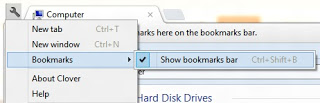
    • You can also bookmark any address for accessing most used/accessed locations. To bookmark any tab, which contains an address of a location, first tick on show bookmark bar by clicking on the wrench button and going to Bookmark, then mark on the Show Bookmark Bar.
    Bookmark any address

    • Bookmark Bar will appear under the tab. Now whenever it needs to bookmark, just drag and drop the file or folder to the Bookmark Bar
    Bookmark Bar Under Tab

    That's it enjoy using this utility and visit daily for more tricks. Like us on facebook and stay updated. If you have any doubt do comment below you will get a reply as soon as time allows

    Selasa, 12 Februari 2013

    Make Free Calls From Mobile For 14 Days

    Hello visitors we are back with a new trick by which you can call your friends for free directly from your mobile. Actually it is not a trick it is a service from fuzebox they are giving 14 days free trial. FuzeBox is a simple and sexy cloud-based, audio, video conferencing solution that makes it easy for anyone, anywhere, across any platform, on any mobile device to quickly and conveniently collaborate face-to-face.

    Make Free Calls From Mobile For Free

    Fuzebox is used by companies with big name for their commercial work but fuzebox is giving a free trial so take a benefit of it. Lets see how to make free call using Fuzebox

    Steps To Make Free Call Using Fuzebox

    • First go to https://www.fuzebox.com/freetrial
    • Signup for free trial by filling the form
    • After signing up verifying your email
    • Note down the two pins you received via email first one is moderator's pin and second one is attendee pin
    • Now dial 0008000016688 (toll free)
    • After call is connected put the first code (moderator) using phone's key pad followed by hash (#)
    • Now wait (don't disconnect)
    • Tell your friend to dial 0008000016688(toll free)
    • Tell him to dial the second pin (attendee) once call is connected followed by hash (#)
    • Done! your call will be connected
    • Have fun with this free calling service for 14 days!
    Visit daily for more Freebies and other tricks. Like us on facebook and stay updated with Latest tricks.

    Selasa, 05 Februari 2013

    Windows 8 Activator 100% Working - The Best One

    Dear Visitors today we are back with a new tool which will help you to make your Windows 8 Activate permanently. Nowadays many Peoples are using Window 8 in Their PC but always getting Problem in Activation,So this post is for all those who want to use Window 8 in their PC without any issue of Activation. This activator is an offline windows 8 activator. This is the 100% working and best windows 8 activator, I considered it best because it also enables the personalization feature.
    Windows 8 Activator 100% Working - The Best One

    Steps To Activate Windows 8 Using This Activator

    • First download the Activator from below link
    Download Windows 8 Activator
    • Now extract the file and run the Activator
    • You will see a command screen., just let it complete its task.
    • Windows will reboot automatically.
    • After reboot, you will see a notification that "Machine is running Activated windows 8" or something similar to it.
    • Check personalize option, Now you would be able to use the Personalize feature as well.

    Screenshot After Activation Of Windows 8

    Screenshot After Activation Of Windows 8
    Finally your windows will be activated. If you face any problem regarding this Activator do comment below, you will a reply as soon as time allows!

    Note : Before extracting this Activator please disable ANTIVIRUS of your system as many Antivirus report this activator as Virus, But it is not harmful at all. Antiviruses detects it as virus because it is not an authorized software. Please believe on us, We have never provided anything which can damage your computer system. If your anivirus is creating problem or deleting this file after extraction then just disable it for sometime and activate it after activation of windows 8.

    Jumat, 11 Januari 2013

    Ultoo Multisender Desktop Client V1.3 - 2013

    Dear Visitors today we are back with new Ultoo Desktop Client which is working without any issue. Using this ultoo desktop client you can send msgs to multiple user and also complete the poll automatically. You can now easily earn free recharge with ultoo. This is latest stable version of ultoo desktop client named as Easy UL2.

    Ultoo Multisender 2013
    There is no special configuration required to use this ultoo desktop client. Just follow below mentioned steps carefully and you easily earn from ultoo using this app. First download the app from below link

    Download Ultoo Desktop Client

    Steps To Use Ultoo Desktop Client 2013

    • After downloading Ultoo destop client extract.
    • Now edit the file acc.txt and enter account and password in below manner
    • your account number give a single space and type password and save it.[see below image]

    Edit acc.txt
    • Now edit the file mes.txt and enter your random messages in each line.[see below image]
    Edit mes.txt
    • Now edit the file pum.txt and enter your random number in each line.[see below image]
    Edit pum.txt
    • Now open the file Easy UL2.exe and login with your username and password and start earning
    Ultoo Auto Poll 2013

    After downloading Ultoo destop client extract.
    Now edit the file acc.txt and enter account and password in below manner
    your account number give a single space and type password and save it.[see below image]

    Kindly share this post with your friends if it helped you. Also like us on facebook and subscribe for email updates. If you face any problem regarding this app do comment below.

    Selasa, 25 Desember 2012

    Airtel to Introduce Wi-Fi Services

    After launch of 4G services in many States of India Airtel has announced to introduce Wi-Fi broadband services in major cities including Delhi, Mumbai and Bangalore. Airtel has Partnered with several cafe, restaurant owners for Airtel WiFi hangout Establishment. Well with this major tied up outlets will get these Wi-Fi setup from Airtel and you can easily connect your unlimited devices and start downloading on the go. No downloading limitation, boosted up speeds and faster browsing so it will be fun connecting with your friends anytime anywhere.

    Airtel to Introduce Wi-Fi Services

    So obviously these services will not be offered for free but these will session based service, you will need to search for Airtel HotSpot and select Airtel Wifi Zone then Activate voucher followed by Login and then you can start browsing and Downloading. If you need to browse for 20 min than you get that plan and your internet will automatically disconnect after that time. So get ready for taste of Airtel wifi as it will launch soon as mentioned on their official website.

    Airtel WiFi plans

    PLANS PRICE DURATION
    Wi-Fi20 Rs.20 30Min
    Wi-Fi30 Rs.30 60Min
    Wi-Fi50 Rs.50 120Min

    There is still no exact date for this service to be released but you can get more information on Airtel W-Fi Services by calling toll free no. 18001022244.

    Share this Post with your friends if you like it.
    Visit daily for more such information, also like us on facebook