Tampilkan postingan dengan label Tip of the Day. Tampilkan semua postingan

Selasa, 25 Juni 2013

How to make an effective pro and con list (using a spreadsheet)


Pro and Con lists are useful any time we need to make a decision, especially when there is no clear choice what the better decision is.

Unfortunately, pro and con lists fall short in a couple areas. Writing down the differences between two choices can help us see clearly what is best for us to do. Unfortunately, these lists often fall short in a couple areas. The first problem is that they are never complete; they are biased towards the first thing that pops into your head. This can be influenced a lot by emotions, often setting reason aside.

Create a new spreadsheet.
Another big problem with a pro and con list is that the decisions are often not properly weighted. Let me give you an example using my favorite car that I bought about 7 years ago (who recently gave up the ghost. Sniff) and a Ferrari, that I did NOT buy... ever.

Pros for buying a Ferrari: Fast, good looking, nice components, comfortable seats
Cons for buying a Ferrari: Expensive, does not seat many people comfortably

Pros for buying a 1998 Ford Taurus: Comfortable, it is a car, very cheap
Cons for buying a 1998 Ford Taurus: Looks a bit weird, has a dent, old, is not even running

Now if you look at the list like what you see above, you should see how obvious the problems with this pro and con list is. First, it only has the first things that came to mind. Second, every pro and con seems to carry the same importance. The reality is that a Ferrari is MUCH more expensive than my Ford Taurus and should carry much more weight.

So in order to do an effective pro and con list, we must weigh each item. I do this using a spreadsheet. I will be using Google docs for this.


The spreadsheet will contain the following columns: Issue (this is whatever you want the pro or con to be), Importance (how important the issue is to you), Item one, Item one total, Item two, Item two total, (you can add as many additional items as you want. Say you want to compare ten different cars. No problem).
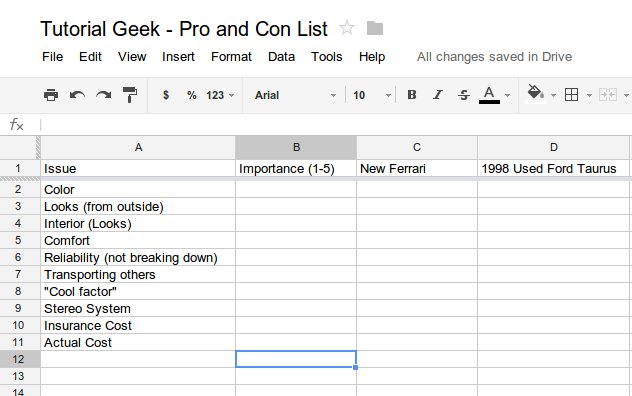

Start the spreadsheet by listing all the issues you can think of. Remember, it is impossible to think of all the different issues so just make sure you at least include the most important issues. If your pro and con list is for something important, it is probably best to take several days to think of all the different issues.


Once you have the issues listed, you can start measuring the importance for each issue. The "Importance" scale can be anything you want. For simplicity's sake, I make the scale from 1-5. I can award each item 1-5 points as well. This essentially means I can award 1-25 points per issue for each item. The great thing about this being in a spreadsheet is that this is easy to change later.

You can see in the spreadsheet above that I am simply multiplying the "importance" cell with the "item" score cell. I have a column for the total.


At the bottom, I add a cell for the total (sum) of the scores for each item.


You can see as I begin adding up each score that the Ferrari is clearly the winner as far as almost all issues go. In a normal pro and con list, it would look like the Ferrari is the best option here.


With everything but the price added up, the Ferrari has 158 points compared to the Taurus' 97 points. Yay! Looks like I will be buying the Ferrari!


Now we are adding in the price. It should be noted that up until this point, everything I have added to this list has essentially been pros. I could have added some issues that were cons as well. For example, I could have added "dents." For importance I would have assigned a negative number. The Ferrari would have scored a 0 (no dents) and the Taurus would have gotten a two, with an importance of -2. This means that 4 points will now be subtracted from the total.


We will do the same thing with price. We will assign the importance with a negative number. The actual number is a bit difficult because $1 will not be the equivalent of 1 point. We could try to figure an exact figure. For example, we could determine that a 5 point stereo system would cost $1000. It has an importance of 5, so 25/1000/ = .025.  We could go ahead and assign -.025 as the importance for "cost." I went even less than that and assigned -.01. Like I mentioned before, this can always be tweaked later. Even if we are grossly wrong, it is good to give a general idea, no matter what figure we use. Many things on this list we can assign a monetary value to (stereo system, AC, paint job, etc) where are other items have no actual monetary value (looks, cool factor, etc). Because of this, whatever value of importance we assign for the cost will just have to be a guess based on the other items.

You can see from the above screenshot that my made up figure of $500,000 for the Ferrari puts the total to a BIG negative number. The Taurus comes up on top with a positive number.


From this next screenshot (above) you can see that even if I change the price of the Ferrari to a comparatively low $10,000, the Taurus still comes out on top. If this seems wrong to you, then perhaps you need to change the scale and ratings. We could change the importance scale to 0-10 and rank the Ferrari as a 10, now giving it 100 points instead of 25.

Obviously a pro and con list on a spreadsheet still has inaccuracies, but these can be reduced through research and tweaking. If anything, making a list such as the one above can simple help you to write your thoughts down and think more clearly (and less impulsively) about an important decision.

Here is the Google Doc file if you would like to download it and use it as a template to try out for yourself.

Jumat, 21 Juni 2013

Why it is best to always buy the largest pizza


Yesterday I bought a pizza. Because I had to carry it home on my bicycle, I decided to get a medium instead of a large. I immediately regretted the decision. Here is why.

I have always known it to be best when buying food to just get the biggest. I mean.... more is better right?! Just how much better is it though?


I went onto Papa John's website here to get some pizza sizes and prices. After that, I figured out the square inches per pizza and the price per square inch. See the stats below:

Pizza Sizes and Prices      Size in Square Inches      Price per square inch
Small (10") = $11       78.5 Square inches       14 cents / Sq In
Medium (12") = $14       113.1 Square inches      12 cents / Sq In
Large (14") = $16      153.9 Square inches       10 cents / Sq In
Extra Large (16") = $19      201.1 Square inches       09 cents / Sq In

So what does this all mean? For one, it means that the large pizza is basically TWICE the size of the small pizza even though it is only $5 more (not $11 more like the price of a small). It means that if the extra large pizza was priced the same as the small, it would cost $28. If the small pizza was priced the same as the extra large, it would cost only $7.40.

So yesterday when I bought the medium pizza, for just $2 more, I could have gotten 40.8 square inches more.

So why all this math? This way I can justify getting the large Slurpee, the large Blizzard, the extra large pizza etc... (actually, the best idea is just to get the largest item and split it with someone else).

Kamis, 28 Februari 2013

Trick to remembering things - Rearrange the items in your pockets


Imagine this situation: Your spouse/significant other/roommate/etc comes into your room while you are wasting time on the computer reading news, or playing a game or something. They ask if you if you will put a letter in the mailbox when you leave for the day. You say "sure" and resume your time wasting activity. A few hours pass and then you need to go to work. You get up, leave the house and go to work. Later that night you go home to an upset person asking why you forgot the letter.


OK; let's change things a bit. This time when you are asked if you put a letter in the mailbox, you say "sure" then immediately remove your phone from your pocket, and place it in your other pocket. Now a couple hours later when you go to work, you feel your pockets to make sure you have your phone and your wallet. When you feel for your phone, you realize it is not there and you think of where you last placed it. At this point, you will remember that you put it in your other pocket to remember the letter. You put the letter in the mailbox, then head off to work. Your phone resumes its position in the normal pocket.

I have been using this method for remember things for many year and it always works. I have not heard or read about it anywhere so I don't know if it has a name; I will henceforth call it the "Disruptive Mnemonic."

Why does this Disruptive Mnemonic work?

Let's think of our minds for a minute. Everyone of us has routines and schedules. Our minds tend to work the hardest when we are doing or learning something new; when we are just doing routine things however, our mind will often go into cruise control. We as human beings are capable of doing some pretty amazing things without really thinking about it. Some people walk and read a book at the same time. How can they do this? Because walking is so routine they no longer need to think about it. What about what people who drive? Even though it is very dangerous, people text, shave, eat food, put on makeup or various other things all while driving. They do this because driving is so routine, we don't really need to think about it (Note: Please don't do these things. They really are dangerous). You would never see someone who is still learning how to drive to send a text message at the same time; this is because they are so focused on driving.


And so things go with our memory. When we are in our routine or schedule our minds tend to relax. It is easy for us to forget things we don't think are very important, because we simple tend not to think or focus on these things. It is that way with taking out the trash or delivering a letter. These are things that we don't usually do on a daily basis so it is not routine. We can easily forget.

How to use a disruptive mnemonic.

The example I gave above was switching pockets with our phone. If you always have your phone in the same pocket, putting it in another pocket will force to think why. This will work with any item you keep consistently in the same pocket; keys, pen, lip gloss, wallet, etc.

This method works well for me because I am a guy and tent to keep a lot in my pockets. What if you are a girl and keep little or nothing in your pockets? If that is the case, you probably use a purse. You could rearrange the items in your purse. Perhaps you could zip up your purse only half way instead of all the way. Anything that will help disrupt your routine will help call your attention to whatever it is you are supposed to remember.

I started doing this when I was in Jr. High school. If I needed to remember something, I would get a scratch piece of paper and write a note on it. I would place it in my pocket and later in the day when I emptied my pockets I would look at the note and remember whatever it was I needed to remember. The thing is, I quickly realized that I never actually needed to read the note. Simply seeing the paper was enough for me to remember. I quickly learned that anything I did to disrupt my schedule would have the same effect.

The disruptive method is nice because you don't need anything fancy. No paper, no writing things down, no calendar. It works best for things you need to remember during the day (probably not a good idea for long term), and it only works well for about one or two items to remember. If you need something that is time or location sensitive, try to do something to disrupt a specific time or place. For example, if you need to remember something for work; place a random object near the things you take to work. If you need to remember something for lunchtime, put something in the fridge or lunchbox (or wallet if you go out to eat).

Any other memory tricks? Write it below in the comments.

Jumat, 25 Januari 2013

Tip of the Day - A smarter way to eat microwave popcorn


Don't know why it took me 20+ years to figure out how to eat popcorn this way.
The photo above basically speaks for itself. I don't know why I had never done this before today, or really what inspired me to do it this way, but I can say this is definitely the best way to eat microwave popcorn. Cutting a hole through the top makes it its own bowl.

Super pro tip: flip the popcorn over and cut off the bottom side. This side is usually greasier. If you cut this off, usually it will bring up some left over kernels stuck to the bag; also the top side (now bottom side) is a lot less greasy so you can feel ok about putting it on a table or lap or whatever.

Sabtu, 18 Agustus 2012

The Best Way to Bypass the Great Firewall of China (Windows and Linux)

FreeGate is the way to go to freely use the Internet in China
Update: Click here for my review of other VPNs and Proxies

If you have plans on going to China for vacation, or living there for any length of time, you will need to prepare to visit the Great Firewall of China. Visiting this tourist attraction is mandatory! As most people know, many websites are blocked in China. Mostly websites related to social interaction such as Facebook, Twitter, Google+ and most the popular blogging platforms such as Wordpress and Blogger (which means if you are reading this, you are either not in China, or you have already figured out a way to bypass the Great Firewall of China.

I have lived in China now for a year and have tried many different tools to try to use the internet freely. I have tried various VPNS, Hotspot Shield and Freegate. The best (and freest) is Freegate.

Read article »

Senin, 14 Mei 2012

Use Gmail as a GTD tool (Getting Things Done and using Gmail more productively)


Most of us have probably used email more than a handful of times to remind ourselves to do something, or as a shopping list of sorts. I recently discovered a way to help me be more organized with my emails and tasks using Gmail. It is quick and easy to do.

I will show you how to get important emails and tasks at the top of Gmail, so you will always see (and never forget) the most pressing things in your inbox.

Read article »

Sabtu, 06 Agustus 2011

Go Exploring to find hidden gems like Spanish Fork Disc Golf Course


OK. So I must admit, this post does not really go too well with the theme of this blog. This is tutorialish, nor is it very geeky (unless you like to call Disc Golf Frolf [Frisbee Golf], in which case, that would be pretty geeky).

That being said, this tip of the day is to encourage you to do what I did yesterday. I went exploring. I hopped on my bike and rode to a mysterious disc golf course that I didn't believe existed, but sure enough, it does! The thing is, every city or town has hidden gems. Take some time to go out on a walk or a bike ride and look for new things. Discover bike paths, hiking trails, new restaurants, fun shops on main street etc.

Read article »

Kamis, 03 Maret 2011

Tip of The Day - Create an RSS feed with any Website (Create Online Classifieds RSS Feed)

Here is a hypothetical situation (not really, I was in this exact situation for the past three weeks). Suppose you are looking for a really sweet deal for a DSLR camera or perhaps a phone. You want the cheapest possible so you obviously are looking for something used. Perhaps online classifieds. Well, to make sure that you are the fist person to find the sweet deal, you need to check the online classifieds frequently. Too bad there is not a way to set up something that would search for you and come up in your RSS feed reader.... bwa ha ha! THERE IS! After three weeks of searching, I have found the solution and will share it with you.

Read article »

Rabu, 02 Maret 2011

Tip of The Day - How To Force Yourself To Exercise (lose weight)

Replacing my desk chair for an exercise bike works wonders!
The other day I was talking to my brother and he had mentioned how even though he plays sports frequently, it is hard for him to find time to exercise otherwise. I am the same way. Tell me to run after a Frisbee and that is no problem; I can do that for hours. Tell me to run because it is good for me, and I will tell you to take a hike (or I will in fact go on a hike myself).

I thought I would do a post on some tips for "forcing" yourself to exercise.

Read article »

Kamis, 24 Februari 2011

Tip of The Day - Backing up files using external media

I recently did a post on different options for backing up and storing files online. Even though online storage and backup is wonderful, there is a chance that we could experience an apocalypse. In that case, online storage would do us no good and we could possibly loose important files (ok... in the case of an apocalypse, files are the last thing to worry about, BUT there IS a chance our file storage company of choice might go under). To ensure that our important files are kept safe, it is wise to consider other methods for backup.

Read article »

Senin, 21 Februari 2011

Tip of The Day - Use Your Email Client To Send and Receive Facebook Messages

Something happened this morning that made me super happy. I replied to a message from Facebook using Gmail and it worked! This must be a new feature because I have never noticed it before. Facebook just started posting message threads in emails so I decided to try to reply in Gmail to see if it would work. It did!

The sad news is that I tried doing multiple threads but it only seemed to work for the initial message sent. As this seems to be a new feature, I will post any updates as I get more info.

Also; if you are like me and you have Facebook notifications going to a spam email account, you can have your spam account forward to your real Gmail account and it works just the same.

If you have had this work for you, or have more info, please post a comment.

Tip of The Day - Your Best Options for File Sharing, Backup and Online Storage

Today I just signed up for another online file storage website. http://uploadingit.com. I tend to sign up for as many different file storage websites just in case they end up being good. Most are not that great, but some are. So far I think Uploadingit.com might be one of the good ones.

Everyone has files that they consider to be important (in many cases, priceless), but most people don't do anything to ensure the safety and protection of these files. I am not going to discuss why you should do this (it should be obvious) but I will talk about some free options available to you.

I will go over some of my favorite online storage websites and discuss some of the advantages and disadvantages of each. Each of the sites I talk about are going to offer free services (yep; I am cheap that way).

Read article »

Kamis, 20 Januari 2011

Tip of The Day - Subscribing to RSS Feeds

If you use the Internet for more than 1 minute a year, then chances are, you have seen an icon that says "RSS" or "Feed." These pretty icons are intended to make our lives easier. Most of us have websites or news that we like to read every day. We may go to many many different websites every day to stay updated on what is going on. Wouldn't it be easier if we could do that with a single page? There is! That is what the pretty RSS button is for. If you have never used it, you should. I will show you how.

Read article »

Rabu, 19 Januari 2011

Tip of The Day - Removing labels or glue with WD-40


For this tip of the day I am going to talk about two of my favorite things in the universe. WD-40 and hydrogen peroxide. They both have about a million uses and they are pretty cheap. I will be showing why WD-40 is amazing for removing glue or labels.

Read article »

Sabtu, 15 Januari 2011

Tip of The Day - Buy things for the lowest possible price

People in general are alway trying to find the greatest deal possible.  Here are some tips for how you can do just that effectively.

For our purposes, we are going to be looking for a Canon DSLR camera; let's see how cheap we can go.

We will be using Google Product Search for this, but the principles apply the same for eBay.com or other similar services.

1. Do a Google search for Canon DSLR
2. Press the "shopping" link above the search results.
3. On the right, press the link "Sort by Price: Low to High"

(At this point, you are probably thinking that this is what you do already...  you are not learning anything new.  These next steps are the more important ones.)

4.  Most of what pops up is going to be cheap accessories that we are not interested in. Put a minus sign (-) in front of that to make it so it does not show up. For example "canon dslr -flash -kit -remote -screen -cap -sd -strap -ring -hood -battery." When you do this, it is not going to show flashes, sd cards, straps etc.  This method works great for some things, but not so great for others. If this is the case (as it is for the dslr canon) then try the next steps below:
5. Try being more specific. "canon dslr camera" creates much better search results (but it also can decrease your chance of finding the cheapest item).
6. Reverse search. Sort by price from high to low, then try finding the page that transitions between actual cameras and camera accessories.  When I do a search for "canon dslr" and sort price high to low, page 30 is about the transition I am looking for.  I already found a camera cheaper this way than doing a search for "canon dslr camera."

Search: canon dslr camera - Search results are clean and easy. Cheapest camera is $448
Search: canon dslr - More search results to look through. Cheapest camera is $399

Spend an extra minute or so and save yourself $50

Selasa, 11 Januari 2011

How to clean your vehicle's headlights - Use toothpaste


Before

After

For the longest time I have thought that my headlights looked very dim and that I could probably clean my headlight covers to remedy this. Yesterday I decided to do something about it.


There are many products you can buy to do this. I am cheap and lazy so I decided to do it another way.

This is actually super easy and relatively quick to do. Searching on Google, I found people using toothpaste doing the same thing here and here and here and here and here and here. So I figured it would be worth a shot.


Read article »

Jumat, 24 Desember 2010

Tip of the Day - Scraping ice off your windshield

Living in Utah, many mornings I get the joy of scraping ice off my windshield.  There was a trick I learned last year that was a great time saver.

If you live in an apartment complex, or park in a parking lot, look for a spot near a tree.  If you can park under a tree (evergreen trees work best), it will prevent ice from forming on your windshield.

Last year I found a nice big juniper tree to park near and I never had to scrape ice off my car!

Senin, 20 Desember 2010

Tip of the Day - Backing up Important Documents

For a few years, I worked in a computer lab giving technical support. The saddest thing I would see is when students would spend hours and hours on a document and have it all lost because they reset the computer or there was a power outage.  There is a simple solution to making sure you never loose a document: Use Google Docs.  Google docs will save your document every 5 minutes. You can access it anywhere you get the Internet, and it is stored on a very secure server.

People may argue that Google Docs does not allow you to do what Microsoft Word does. This is true.  Usually, I will type my document in Google Docs, then print it or change the formatting in Word; but at least this way I know I have it backed up.

If you still don't want to use Google Docs, please please please, save your document as soon as you start one, and save frequently.  If you have a power outage, or your computer resets for some reason, if Word's auto recovery does not work, you can always try file recovery software like Recuva.

Sabtu, 18 Desember 2010

Tip of the Day - Running Programs from your USB Drive

One thing that I have been doing for the past 5 years or so has been running all my programs from a portable or USB drive.  This allows me to take my software wherever I go.  If I need to use certain programs on other people's computers (or on school computers where they don't allow you to install software), this has been a perfect solution.

I recommend using portableapps.com or liberkey.com

Both of these come with custom start menus and other options.

I started out using portableapps, but recently I have been using liberkey.  Liberkey allows for automatic updating of the software. This is a great way to keep your software updated and organized.

Rabu, 15 Desember 2010

Tip of the Day - Using someone elses computer to use the Internet

Ever been to a friend's place and needed to use their computer for just a bit?  You get on, then log off their Gmail, log off their Facebook etc just so you can log into the same websites.

Next time you need to do that, try this: Use the browser's incognito or private browsing mode (CTRL+SHIFT+P for Firefox or CTRL+SHIFT+N for Chrome).  This way, it keeps the existing user logged in to their email or Facebook, and you can still log in.  It won't keep track of your history or passwords and it is a quicker and hassle free way to use someone's computer without having to log them out.