Tampilkan postingan dengan label Vodafone tricks. Tampilkan semua postingan

Kamis, 18 Juli 2013

Vodafone 3G Trick - July 2013

Hello visitors it's almost one week that I haven't posted any trick. So today I'm back with new vodafone 3g trick working almost all over India. This trick is based on TCP port config. This config is tested and confirmed working in MH, Gujarat and Delhi circles. To use this config you must have minimum balance of RS 1 is required in your Vodafone SIM.

Vodafone 3G Trick - July 2013

With this Vodafone trick you can get maximum speed according to your network . As we known vodafone 3G gives bandwidth of 21mbps. So grab this trick before it gets blocked.
Features of Vodafone 3G Trick

  • No Disconnection Problem
  • Based on Fastest Vodafone 3G Trick.
  • No speed capping
  • Downlading speed upto 3-4 mbps in IDM
  • No Need Registration Required
  • APN www or portalnmms

Steps to configure Vodafone 3G Trick

User’s who are using our VPN Tricks are much familiar with the Steps, for the newbies, Please follow the steps properly.
  1. First Download Vodafone 3G Config from below link
  2. Download Vodafone 3G Config.
  3. Extract it, and Paste it into NMD VPN Config folder
  4. If you do not have NMD VPN, Then download NMD VPN
  5. Connect with apn Portalnmms or www
  6. Run NMD VPN as Administrator and connect with given Configs
  7. Connection will be established successfully. :)

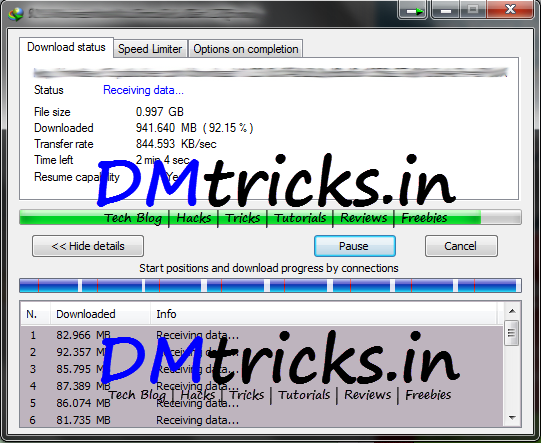
Screenshot Of Downloading Using Vodafone 3G Trick

Screenshot Of Downloading Using Vodafone 3G Trick

Be Social! Take a second share this post with your friends if it helped you.
If you face any problem regarding this Vodafone 3G Trick  do comment below also like us on facebook and stay updated with latest posts.

Kamis, 20 Juni 2013

Vodafone TCP VPN Config working in many States - June 2013

Hi All Visitors, It has been 5 days since I have not posted any tricks or VPN Trick. But Finally we are sharing a Working TCP config for Vodafone. This config is working all over India. This is completely new Un-shared VPN config. Speed is much better as compared to other TCP configs.

Vodafone TCP VPN Config working in many States - June 2013

Vodafone VPN Trick which are virally scattered over the web. But Not all are working and some are locked with boring surveys. DMtricks.in will provide this working TCP config without survey.

Features Of Vodafone TCP VPN Config

  • No balance deduction
  • No disconnection issues
  • No sim blocking
  • No speed capping
  • Downloading Speed 300-500 kbps
  • No Registration Required

How To Configure Airtel UDP VPN Config for South India

User’s who are using our VPN Tricks are much familiar with the Steps, for the newbies, Please follow the steps properly.
  1. First Download Vodafone TCP Config from below link
  2. Download Vodafone TCP Config.
  3. Extract it, and Paste it into NMD VPN Config folder
  4. If you do not have NMD VPN, Then download NMD VPN
  5. Connect with apn Portalnmms
  6. Run NMD VPN as Administrator and connect with given Configs
  7. Connection will be established instantly.

Screenshot Of Downloading With Vodafone TCP VPN Config

Screenshot Of Downloading With Vodafone TCP VPN Config

Be Social! Take a second share this post with your friends if it helped you.
If you face any problem regarding this Vodafone TCP VPN Config do comment below also like us on facebook and stay updated with latest posts.

Rabu, 03 April 2013

Get Free Live IPL Commentary on All Network

Hello Guys! IPL has started and everyone wants to be updated with live scores. Everyone try to get updated with live scores and commentary. But due your busy schedule or any other problem you might not be updated. So here we have come with an exclusive trick by which you can listen live IPL commentary on your mobile for absolutely free.
Get Free Live IPL Commentary on All Network

How Listen Live Commentary of Pepsi IPL

  • This trick works with every operator Just you need to maintain very low balance on your phoe. If you have more than RS 5. Balance then this trick won’t work.
  • You need to maintain balance less Than RS 1
  • Just dial 58888064 form your mobile and Activate the IPL plan
  • The plan deducts Rs.5 per day from your main balance, but due to some bug this service also gets activated in less balance and 0 balance deduction occurs.
  • You get Free IPL Commentary absolutely free. To listen the commentary dial the same Number.

Well this trick was quite simple. This trick is confirmed working all over India on ALL networks. You can also watch Live IPL Streaming by visiting official IPL YouTube page powered by India times.

Stay tuned for latest Pepsi IPL updates and for other tricks. Also like us on Facebook and stay updated.

Kamis, 28 Maret 2013

Vodafone 3G VPN Trick For April 2013

Dear visitors today we are back with new Vodafone 3G VPN trick which is working in many States. This VPN trick is based on TCP port. This trick will work for you if TCP port is open in your State. This Vodafone trick is based on portalnmms APN, for some states you can also try on www APN.


This trick is confirmed working in Delhi and some other States. You can obviously try it in your sates and if its working do comment below so other users will get idea whether this trick will work in their State or not

Features Of Vodafone VPN Trick

Steps To Configure Vodafone 3G VPN Trick

  • First download the NMD VPN and the config files.
  • After downloading this config and NMD VPN just Install the VPN.
  • Now extract downloaded Config files and paste it in NMD VPN Config folder
  • Run the NMD VPN
  • Windows 7 and 8 Users : Make sure you have run the Program as the Administrator.
  • Just connect the with any of the given servers, if you are experiencing the disconnection problem then try the other config.
  • The connection will be established instantaneously.

Screenshot Of Vodafone 3G VPN Trick

Steps To Configure Vodafone 3G VPN Trick

If this post helped you do share it with your friends so they can also get benefit of this trick. Visit daily for more tricks, also like us on facebook and stay updated.

Kamis, 21 Maret 2013

Vodafone TCP VPN Trick Working In Some States

Today new are back with new Vodafone VPN trick which is based on TCP port. This vodafone VPN trick is working in many northern states. This trick has no disconnection problem. This trick was working earlier also but it was blocked by Vodafone but now it is working again. So take the benefit of it before it gets blocked. Using this trick you  can get around 150 Kbps transfer rate.


This trick is confirmed working in UP East and West and other States user can try in their states. To use this trick just follow below mentioned steps carefully. First lets have look on some features of this trick.

Features Of Vodafone TCP VPN Trick

  • Based On TCP port
  • Use the APN : portalnmms
  • Working in Both 2G and 3G Mode.
  • No registration required.
  • Torrent Downloading supported
  • Speed is average
  • No SIM Blocking
  • Works at Zero Balance

Steps To Configure Vodafone TCP VPN Trick

  1. First download high speed Vodafone configs from below link
  2. Download High Speed Vodafone Configs
  3. Extract downloaded Config files and paste it in NMD VPN Config folder
  4. If you don't have NMD VPN download it form here
  5. Run NMD VPN as Administrator and connect with any given Configs
  6. It will be connected instantly
  7. Enjoy using free Vodafone 3G!!!

Screenshot Of Vodafone TCP VPN Trick

Screenshot Of Vodafone TCP VPN Trick

Visit daily for more Vodafone 3G tricks, also like us on facebook and stay updated. Share this post with your friends

Minggu, 03 Februari 2013

Vodafone 3G VLIVE VPN Trick - 100% Working

Today we are back with new Vodafone 3G Trick which is working in many States. This VPN trick is based on TCP Port. Using this VPN trick you will get around 100-150 kbps speed. This trick was working earlier also but it was blocked by Vodafone but now it is working again. So take the benefit of it before it gets blocked. This trick is based on the portalnmms APN, and for few states it is working with www APN too. If you are the user from the North side then, try the portalnmms APN


Let not waste the time and have a look on Features of Vodafone VLIVE trick. And how to configure it.

Features Of Voadfone VLIVE VPN Trick

  • Connects with zero balance.
  • Works with default both APN www or Portalnmms
  • No registration required.
  • HTTPS protocols supported
  • Resume supported Downloading.

Steps To Configure Voadfone VLIVE VPN Trick

  • To use this trick you need to have NMD VPN installed on your PC.
  • If you don't have NMD VPN download it from here.
  • Now Download highspeed Vodafone TCP config.
  • Now Extract Downloaded Config files and paste it into C:> Program Files > NMD VPN > Config.
  • Run NMD VPN as Administrator and connect with given Config.
  • If it fails to connect try 3-5 times it will be connected.

Screenshot Of Voadfone VLIVE VPN Trick


Visit daily for more Vodafone tricks. Like us on facebook and stay updated with Latest tricks. If you face any problem regarding this trick do comment below. You will get a reply as soon as time allows!

Senin, 28 Januari 2013

Vodafone 3G TCP VPN Trick For Feb 2013

First of all sorry to our daily visitors for a delayed post. Our blog was not updated since one week but from today it will be updated daily. After almost one week we are back with new Vodafone TCP VPN trick working in many sates. There is no disconnection problem in this VPN trick. This Vodafone trick is based on high-speed servers. As this trick is based on TCP Port speed will be less than what we get using UDP tricks. But speed is not not very slow, we can say its average.

Features Of Vodafone TCP VPN Trick

  • Based on high speed servers
  • Https protocols are supported
  • Average speed
  • Resume Supported Downloading
  • Torrent downloading supported
  • No registration required

Steps To Configure Vodafone TCP VPN Trick

  • First download Vodafone TCP Config file from below link
  • Download Vodafone TCP Config
  • After downloading extract the config files and paste it into NMD VPN Folder.
  • Download NMD VPN (if you don't have)
  • Now connect with APN as www
  • Now run NMD VPN as Administrator and connect with Vodafone TCP Server.
  • It will be connected immediately.
  • Enjoy using free Voadfone 3G!!!!

Screenshot Of Vodafone 3G Trick

Screenshot Of Vodafone 3G Trick

Visit daily for more Vodafone tricks and other hacks. Also like us on facebook and stay updated with latest hacks.

Sabtu, 05 Januari 2013

Vodafone 3G Proxy Trick Working - Jan 2013

Here is Latest Vodafone proxy trick which is working in many Northern States. Vodafone does not have speed capping so you can enjoy high speed 3G. There is no disconnection problem like VPN tricks in this Vodafone proxy trick. This Vodafone 3G Trick is based highspeed proxies. To use this Vodafone tricks you need to have minimum balance of RS 1.

Vodafone 3G Proxy Trick Working - Jan 2013

As this trick is based on proxies you have to disconnect after every use of 1GB to avoid sim blocking. No extra setup is required to use this trick just follow below mentioned steps carefully to avoid any problem, first lets have a look on some of it's feature.

Features Of Vodafone 3G Proxy Trick

  • No Speed Capping Problem
  • Based on default Apn www
  • No need register for any external Account
  • Based on highspeed proxies
  • Minimum balance RS 1 required.
  • HTTPS protocols are supported
  • Resume Supported downloading in IDM.

Steps To Use Vodafone 3G Proxy Trick In Mobile

Create a new Configuration Settings on your Mobile
  • Account name: Thefuturehack_Vodafone
  • Access Point: www
  • Proxy:  72.10.53.126
  • Port: 80
  • Home Page: http://203.115.112.27 or any working in your State
  • Now save the setting and open your homepage.

Steps To Use Vodafone 3G Proxy Trick In PC

If you use Datacard then Create a New Profile for using Vodafone 3G Proxy Trick
  • Profile Name: Thefuturehack_Vodafone3G
  • Select Static APN and Enter Access Point as: www
  • Now open your browser Firefox or Chrome. read more
  • In Network Settings enter below mentioned proxy and port
  • Proxy: 72.10.53.126
  • Port: 80
  • Set Home Page as: http://203.115.112.27 or any working in your State
  • Now save the setting and open your homepage.
  • Done! Enjoy free high speed Vodafone 3G!!!

Screenshot For Vodafone 3G Proxy Trick

Screenshot: Vodafone 3G Proxy Trick - Jan 2013

Kindly share this post with your friends if it helped you. Also like us on facebook and subscribe for email updates. If you face any problem regarding this trick do comment below.

Jumat, 21 Desember 2012

Vodafone 3G TCP VPN Trick - 100% Working

Today we are back with another Vodafone 3G trick which is working in many Northern States. This trick is based on BookVPN Service. Book VPN has very high speed severs so the speed would be up to maximum. This trick has been tested in UP and it's confirmed to be working there. There is no Disconnection problem while using this trick. You can also try it in your states and if it's working comment below.

Vodafone 3G TCP VPN Trick - 100% Working

It is very easy to use this trick, just follow below mentioned steps carefully and you can easily enjoy using free 3G.

Steps To Use Vodafone 3G VPN Trick

  • Download Vodafone 3G Confing from here
  • Now just extract the downloaded config and paste it into NMD VPN Folder.
  • If You don't have NMD VPN download it from below link
  • Download NMD VPN
  • Now connect with APN www
  • Now run NMD VPN as Administrator and connect with Vodafone server.
  • It will connect Instanly.
  • You can get Maximum Speed according to your network.

Screenshot

Screenshot: Vodafone 3G TCP VPN Trick - 100% Working

Share this Post with your friends if you like it.
Visit daily for latest hacks, also like us on facebook

Kamis, 20 Desember 2012

Latest Vodafone 3G TCP Trick - Working

Today we are back with new Vodafone 3G trick which is working in many states of India. Recently TCP ports were blocked by Vodafone but it's open again so we have to take benefit of it. This trick is based on TCP VPN. It has very high servers, so you can get around 3mbps speed. This high speed servers also support torrent.

Latest Vodafone 3G TCP Trick - Working

There is no Disconnection problem while using this trick. You need to Register on PrivateTunnel to use this trick which gives your 300 MB Day in Trial Accounts. This trick is confirmed to be working in many Northern states like UP, Delhi and West Bengal. But, you can try in your states and if it's working comment below.

Steps To Use Vodafone 3G TCP Trick

  • Download Vodafone 3G TCP config from here.
  • Copy the downloaded config in NMD VPN folder.
  • If You don't NMD VPN download from here.
            Now Register on PrivateTunnel VPN Service for Free.
    1. After registration you will get your username and password.
    2. Copy and paste your Username and password of PrivateTunnel in Pass.txt file which is in config folder.
    3. Now connect with APN as www
    4. Now run NMD VPN as Administrator and connect with Vodafone 3G High Speed TCP Server.
    5. It will connect instantly.
    6. Enjoy free 3G!!!!
    Share this post with your friends if you like it.
    Visit us daily for more 3G tricks, also like us on facebook

    Sabtu, 24 November 2012

    Vodafone 3G VPN Trick Working In Many States

    Dear Visitors today we are back with another Vodafone trick which is work in many states. Recently shared Vodafone tricks are also working in some states but there is balance deduction problem in some states. But today we are back with this new Vodafone VPN trick. Using this trick there is no balance deduction problem which is now happening with some previous tricks. This New Vodafone VPN Trick is based on Kebrum VPN Account,so you will have to register on their website.This config includes high speed proxy.

    Vodafone 3G VPN Trick Working In Many States

    This new Vodafone VPN trick is Working in many northern and southern states like Rajasthan and UP, Karnataka, Maharashtra..etc. This tricks is very high-speed you will get almost 250KBPS speed while downloading.

    Steps To Use Vodafone 3G VPN Trick

    • Download VPN config from here.
    • Download NMD VPN from here (if u don't have).
    • Register to Kebrum VPN here.
    • After Registration note your Username and password  which you get on your Inbox. Enter the username and password in pass.txt.
    • Extract the downloaded config to C>Program Files> NMD VPN> Config.
    • Connect with apn www.
    • Now go to NMD VPN connect with any server.
    • It will connect instantly.
    • Done! Enjoy free 3g.
    Be Social! Take a second share this post with your friends if it helped you. Also like us on facebook and stay updated with latest posts.

    Rabu, 21 November 2012

    Vodafone 3G Trick Using Vnap 100% working

    Good days are still going on for Vodafone user. Recently we have shared many vodafone tricks and all are confirmed to be working. Today we are back again with a new vodafone trick which can be used by using Vnap. This vodafone tricks much easy to use then other tricks as this trick does not requires lots of configuration. Major advantage of vodafone tricks is that there is no speed capping like airtel. You can get around 300 kps speed using this trick. This trick is working in may states.

    Vodafone 3G Trick Using Vnap 100% working

    Vnap Net Buster is a Applications much similar like a VPN, but very easy than that it enables you to add some tweaks and connect with internet. You must have .Net framework installed in your PC to use Vnap.

    Steps To Use Vodafone Vnap Trick

    1. Download the Vnap.NetBuster Proxy Pro from here.
    2. Download .Net famework from microsoft's official website( If don't have)
    3. Install Vnap and run it.
    4. Connect with apn portalnmms.
    5. Go to Vnap and enter below mentioned proxy and port.
    6. Proxy: 10.10.1.100 Port: 9401
    7. Enter any Back query from below mentioned Back quires.
            ?live.vodafone.in
            ?10.11.233.29
            ?wap.hungama.com

    Short Tutorial For Using Vnap:

    Vnap quick tutorial
    • For changing settings click on profile> edit
    • Click on proxy and enter the proxy and port.
    • Click on url handler, check enable backquery and enter anyone Back query from above.
    • Save the setting and click Start button.
    This trick is confirmed to be working in many Southern States and in some parts of UP. You can try this trick in your state and if it's working comment below. Enjoy with this trick.
    Be Social! Take a second share this post with your friends if it helped you. Also like us on facebook and stay updated with latest posts.

    Minggu, 18 November 2012

    Vodafone 3G Trick With SpotFlux VPN Working In Many States

    Today we are back with another Vodafone which is working in many states. Recently we shared many Vodafone tricks which has benifited to our visitors.This tricks is also another TCP based VPN trick. VPN tricks are always better as they are secure as compared to other tricks. SpotFlux Continuously scans and protects your connection for inbound threats. The main advantage of vodafone tricks are that there is no speed capping like airtel.

    Vodafone 3G Trick With SpotFlux VPN Working In Many States


    This Vodafone VPN trick is M.P, MH & in some Norther States. Try this trick in your state and if it's working comment below. If this trick is not working for you, you can use UltraSurf trick. It is very easy to use this trick just follow below steps and you can use free 3g using your vodafone sim.

    Steps To Use Vodafone SpotFlux VPN Trick

    1. As this is VPN trick you need to download the config file and copy it in to NMD VPN.
    2. Download Config file from here
    3. If you don't have NMD VPN download it from here
    4. Now Copy the downloaded config in NMD VPN folder and run NMD VPN as administrator.
    5. Now connect with APN portalnmms,(minimum blance of RS1 is required to connect).
    6. Go to NMD VPN connect with Spotflux server, it will connect instantly.
    7. Done! Now you can use free 3g.

    Screenshot

    Screenshot using Vodafone SpotFlux Trick

    This config is specially modified for M.P although it is working in many other states also. If you have any issuse you can try using different port and modify the config.

    Be Social! Take a second share this post with your friends if it helped you. Also like us on facebook and stay updated with latest posts.

    Jumat, 16 November 2012

    Vodafone Latest Trick With UltraSurf 100% working

    Today we are back again with new vodafone trick which is 100% working. UlrtaSurf is a Secure IP Tunneling Software which is pretty much similar to PD Proxy, but the difference is that it is completely free and does not have any limit like PD Proxy. As we all know that tunneling softwares allow you to surf the web securely by changing your IP address. UlrtaSurf is better than PD Proxy as it is completely free!


    There is no speed capping in vodafone like airtel so you can get 3g speed using 3g network. There is no disconnection problem like VPN Tricks. But maximum you can get upto 300kps as this tricks is based on TCP proxies not UDP.
    Vodafone Latest Trick With UltraSurf 100% working


    Steps To Use Vodafone Ultrasurf trick

    1. First you need to download the free software known as UltraSurf from below download link.
    2. Download UltraSurf From Here.
    3. Extract the zip file and run the UltraSurf.
    4. Connect with apn portalnmms.
    5. Open UltraSurf , go to option> click on proxy setting> click on manual proxy setting and enter the below mentioned proxy.
    6. Proxy Host- 10.10.1.100, Proxy Port- 9401 click on ok and save the setting.
    7. In your browser change proxy setting to manual and enter below mentioned proxies.
    8. Proxy- 127.0.0.1, Port- 9666.
    UltraSurf Proxy Setting
    Using this trick you can download unlimited. For downloading  you have to change IDM proxy setting and enter the same proxy and port which you entered in your browser.
    That's it now you can use free 3g using you vodafone simcard. This trick is confirmed to be working in many Norther States UP, Dehli..etc and in some Southern States, but you can try in your state and if it's working comment below.

    Be Social! Take a second share this post with your friends if it helped you. Also like us on facebook and stay updated with latest posts.

    Selasa, 06 November 2012

    Super Speed Vodafone Proxy Trick

    Today we are back with new high speed vodafone proxy trick. This vodafone proxy is resume supported. The advantage of vodafone tricks are that there is no speed capping like Airtel. This trick can be used both in mobile & PC. In this vodafone trick there is no disconnection like vpn tricks.

    Super Speed Vodafone Proxy Trick

    Steps to use Vodafone Super Speed Proxy Trick

    Just follow below steps Properly for no problem with this trick. You must know free working homepage for your state to use this trick. For tricks not easily get blocked we cannot post working homepages for every state openly.

    Steps for Mobile

    For using this trick you need any Latest browser.
    1.  Connect with Apn portalnmms.
    2. In url bar type:  free-hp.mancos.de
    3. Replace free-hp with working homepage of your state.
    4. Done!

    Steps for PC

    1. Connect with apn www.
    2. Open your browser In address bar type free-hp.mancos.de
    3. Replace free-hp with working homepage of your state.
    4. Done!

    For Downloading in IDM


    Click on option > Proxy/Socks >Tick use proxy > In proxy address type free-hp.mancos.de>Port 80
    Now you can download unlimited with this proxy trick.

    Be Social! Take a second share this post with your friends if it helped you. Also like us on facebook and stay updated with latest posts.